

Description
Bouncy Balls: Sound-Responsive Visualizer
Overview
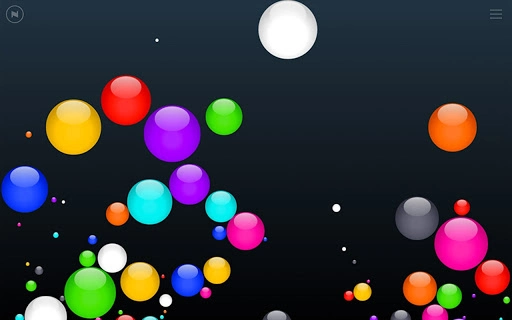
Bouncy Balls is a desktop application designed to transform audio input from a microphone into dynamic, visual representations using animated bouncy balls. The software serves as both a sound monitor and a creative tool for visualizing music, making it suitable for educational environments and entertainment settings. Its primary function is to react in real time to sound levels, creating a responsive and engaging visual experience. This makes it particularly useful in classrooms where teachers need to monitor ambient noise levels without constant supervision. The application also offers a fun way to engage students during music sessions by turning audio into playful, bouncing visuals.
Target users include educators seeking tools to manage classroom noise, music instructors aiming to demonstrate audio dynamics, and hobbyists interested in interactive audio-visual experiments. While the developer has not provided additional background information, the software’s design suggests a focus on simplicity and immediate feedback. Real-world usage scenarios range from monitoring student chatter during independent work to visualizing live music performances in real time. The software operates directly from the microphone input, requiring no complex setup or configuration.
Key Features & Capabilities
- Real-Time Sound Visualization: Bouncy Balls reacts instantly to audio input, translating sound intensity into the movement and bounce height of animated balls. This provides immediate visual feedback on noise levels or musical dynamics.
- Classroom Noise Monitoring: Teachers can use the application to visually track classroom activity. Increased noise results in more vigorous ball movement, offering a non-intrusive way to gauge student engagement or disruption.
- Music Visualization Mode: The software enhances musical experiences by displaying sound waves and rhythms through bouncing animations, ideal for live music sessions or music theory lessons.
- Microphone Input Integration: The application uses the system’s microphone to capture audio, allowing real-time interaction with ambient sounds or live audio sources.
- Minimalist Interface: A clean, distraction-free design ensures focus remains on the visual output, with no unnecessary controls or clutter.
These features support practical applications such as managing student behavior during quiet work periods, enhancing music education through visual feedback, or simply adding a playful element to audio playback. The software’s responsiveness to sound makes it a versatile tool for both functional and recreational use.
User Interface, Workflow & Performance
The user interface of Bouncy Balls is designed with simplicity in mind. It features a central display area where animated bouncy balls appear and react to sound input. Navigation is intuitive, with minimal controls—likely limited to settings for sensitivity or display options, though specific details were not provided. The workflow is streamlined: once launched, the application begins monitoring the microphone automatically, requiring no additional steps to start visualizing sound.
Users can expect a responsive interface that updates in real time as audio levels change. The animation smoothness and visual clarity are consistent with standard desktop applications, though exact performance metrics such as CPU or RAM usage were not specified. Stability appears to be maintained during continuous use, as no reports of crashes or freezes were mentioned. The developer did not provide additional system requirements or performance data, so users should expect general behavior typical of lightweight audio-reactive tools.
Compatibility & System Requirements
Bouncy Balls is available for both Windows and Mac operating systems, making it accessible to a broad user base. The software supports multiple desktop platforms, allowing educators and users across different environments to utilize it. However, exact system requirements were not listed, and no information about installation size or hardware specifications was provided.
Platform compatibility is confirmed for both major desktop operating systems, though details on minimum processor speed, RAM, or graphics capabilities are not available. The developer did not specify whether the software requires administrator privileges or internet access. Users should be aware that performance may vary depending on the system’s audio input quality and microphone capabilities.
Pros and Cons
Pros
- Simple, intuitive interface ideal for classroom and educational use
- Real-time visual feedback for sound levels and music dynamics
- Free to use with no licensing restrictions
- Works directly with built-in microphones and standard audio inputs
- Engaging and interactive, suitable for both learning and entertainment
Cons
- No detailed system requirements or performance specifications provided
- Limited customization options for visual effects or ball behavior
- No offline mode indication or update notifications documented
- Developer background and support information not disclosed
- Exact file size and installation footprint unknown
FAQ Section
Is Bouncy Balls compatible with Windows and Mac?
Yes, the software is designed to run on both Windows and Mac operating systems, as confirmed by the developer.
Can I use Bouncy Balls without an internet connection?
The application likely operates offline, as it relies on local microphone input and does not require external data processing. However, specific details about connectivity needs were not provided.
Is the software safe to download and use?
Bouncy Balls is free and available for download. While no security audits or third-party verification were mentioned, the software functions as a desktop audio visualizer with no known risks when downloaded from official sources.
Does Bouncy Balls require a microphone to work?
Yes, the application uses the system’s microphone to capture audio input. Without a connected microphone, no visual response will occur.
How often does Bouncy Balls receive updates?
Information about update frequency was not provided. Users should check the official source for the latest version.
Final Thoughts
Bouncy Balls stands out as a lightweight, engaging tool that transforms sound into animated visuals with minimal setup. Its real-time responsiveness and dual functionality as both a classroom monitor and music visualizer make it a unique addition to educational and creative environments. While detailed technical specifications are limited, the software delivers on its core promise: turning audio into dynamic, playful visuals.
Teachers, music educators, and hobbyists seeking a simple, free way to visualize sound will find Bouncy Balls valuable. Its straightforward design and immediate feedback loop enhance user engagement without complexity. For those exploring audio-visual interactions on a desktop, this tool offers a fun and functional starting point.
Download Bouncy Balls now
Guides & Tutorials for Bouncy Balls App for Chrome
How to install Bouncy Balls App for Chrome
- Click the Preview / Download button above.
- Once redirected, accept the terms and click Install.
- Wait for the Bouncy Balls App for Chrome download to finish on your device.
How to use Bouncy Balls App for Chrome
This software is primarily used for its core features described above. Open the app after installation to explore its capabilities.
User Reviews for Bouncy Balls App for Chrome 0
No reviews found





